
Beginner Prompt Examples for Turning Images Into Short AI Videos
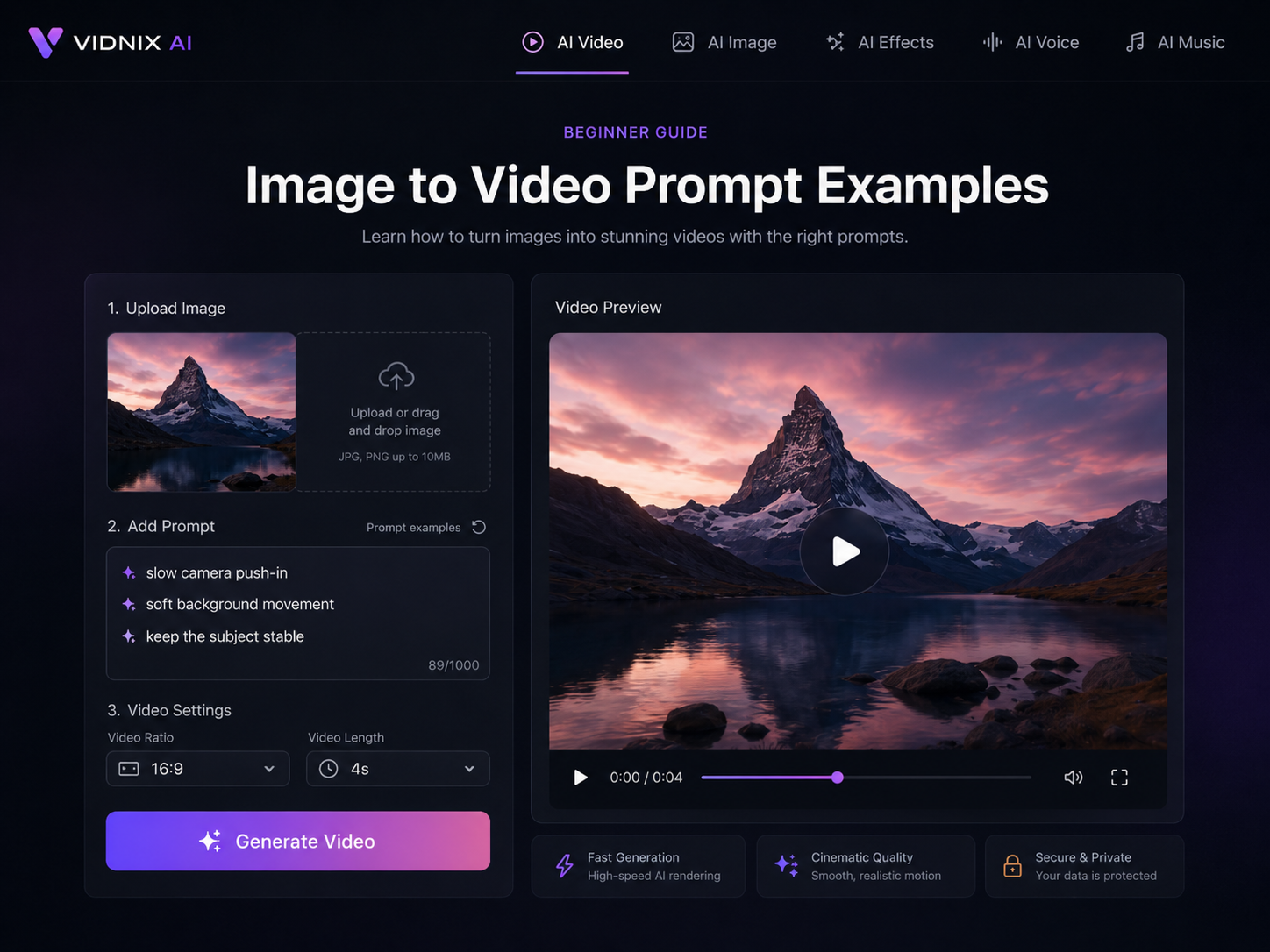
A still image can already show a product, a campaign idea, a personal brand moment, or a social post concept. However, short motion often makes the same asset easier to notice in a feed, on a landing page, or inside a launch teaser. For creators, marketers, social media teams, ecommerce teams, and small business operators, image to video ai free workflows are useful because prompt testing can begin with one existing image. Instead of planning a full video production process, a simple beginner prompt can describe how the image should move.
This guide focuses only on prompt examples for beginners. Therefore, it does not cover advanced troubleshooting, third-party tool comparisons, or complex model settings. The goal is practical: show how to write image-to-video prompt examples that describe motion, mood, camera direction, and visual stability in clear language.
Quick answer: a good beginner motion prompt should include the subject, one main movement, one stability instruction, and one mood. Start small, test one image, then save the prompt version that works best.
Contents
Why simple prompts work Prompt template Motion words Suitable projects Social prompts Product prompts Marketing prompts Selection path FAQ
Why Simple Prompts Usually Work Better
First, a beginner prompt works best when it gives the AI one clear job. A still image already contains the subject, frame, color, lighting, and composition. Therefore, the prompt should not rebuild the whole scene. It should explain how the existing image should move.
For example, a product shot may only need a slow camera push-in and soft background light movement. Meanwhile, a portrait may need subtle hair motion and a calm background breeze. In both cases, the prompt supports the image instead of forcing a new visual direction.
However, many first prompts become too crowded. They ask for zooming, panning, lighting changes, facial motion, object motion, background motion, dramatic style, and cinematic energy at the same time. As a result, the final clip can feel busy or unclear.
A stronger beginner prompt answers four simple questions. What is the main subject? What should move? What should stay stable? What mood should the clip create? Once these answers are clear, the prompt becomes easier to reuse across social posts, product teasers, ad tests, and landing page visuals.
In addition, clear prompts make testing easier. If one version uses a slow zoom and another uses a gentle pan, the difference is easy to judge. On the other hand, if every prompt changes five things at once, learning from each result becomes harder.
A Simple AI Video Prompt Template for Beginners
A practical AI video prompt template should be short, repeatable, and easy to adjust. Instead of using technical language, it should describe the subject and motion in the same way a simple creative brief would describe a shot.
Use this structure as a starting point:
Therefore, a complete beginner prompt can be simple: “Animate the skincare bottle with a slow camera push-in. Add soft light movement behind the product. Keep the label, shape, and color stable. Use a clean, premium mood.”
This prompt works because every sentence has a job. The first sentence sets the subject and camera motion. The second adds background motion. The third protects the product. The fourth guides the final feel.
Likewise, the same structure can support a portrait. “Create a calm motion from this portrait. Add subtle hair movement and a soft background breeze. Keep the face natural and stable. Use a warm, relaxed mood.” This version follows the same logic but fits a different image type.
For source images that already look strong, the image-to-video tool is the most natural next step. Upload the image, add a beginner motion prompt, and use the result to test short visual ideas for social posts, ecommerce visuals, campaign assets, or landing page sections.
Try a beginner image-to-video prompt
Beginner Motion Words That Make Prompts Clear
Motion words matter because they tell the AI what should happen on screen. However, many beginner prompts use broad words that sound nice but lack direction. A phrase like “make it dynamic” can mean many different things.
Instead, clear motion words describe visible action. For example, “slow camera push-in” is more useful than “cinematic.” Similarly, “soft background light movement” is more specific than “beautiful atmosphere.”
The following beginner motion words work well across many image-to-video prompt examples:
- Slow camera push-in
- Gentle camera pull-back
- Subtle camera pan
- Soft background movement
- Natural hair movement
- Gentle breeze
- Light shadow movement
- Slow product rotation
- Minimal parallax
- Soft depth movement
- Calm water ripple
- Floating particles
However, motion should match the image. A luxury product image often needs slow and controlled movement. Meanwhile, a travel photo may support drifting clouds, soft water movement, or a wider camera pan.
In contrast, a clean ecommerce product image usually needs less motion. The product should remain easy to recognize. Therefore, the safest beginner pattern is one camera movement plus one background movement.
For example, “Use a slow camera push-in with soft background light movement. Keep the product centered and stable.” This prompt is short, but it gives the AI a useful creative direction.
Suitable for These Projects
This article is most useful when the goal is to test simple motion ideas from existing visuals. It fits teams that already have photos, product images, campaign graphics, posters, lifestyle shots, or social content assets.
In other words, the starting point is not a blank script. The starting point is a still image that needs a small amount of motion.
This keeps the article aligned with search intent. A reader arrives looking for prompt examples, learns how to write them, sees where Vidnix fits naturally, and knows the next step without being pushed too hard.
Prompt Examples for Social Media Clips
Social media clips need quick visual interest. However, they do not always need aggressive movement. A short image animation can work well when the motion begins gently and the main subject stays clear.
For example, a portrait post can feel more present with a slow camera push-in. A product teaser can feel more polished with subtle light movement. Meanwhile, a lifestyle image can become more scroll-friendly with a calm pan and soft background motion.
Portrait or Personal Brand Image
Prompt example: “Animate this portrait with a slow camera push-in. Add subtle hair movement and a soft light shift in the background. Keep the face natural, calm, and stable.”
This prompt fits creator profiles, founder photos, speaker images, and personal brand visuals. Additionally, it avoids unnatural facial changes. The focus stays on presence, mood, and subtle movement.
Product Teaser for a Feed
Prompt example: “Create a short product teaser from this image. Use a smooth camera push-in and soft shadow movement. Keep the product shape, label, and color stable. Make the scene clean and modern.”
This example works for launch posts, simple ad tests, ecommerce previews, and product announcements. Moreover, it keeps the visual centered on the original product instead of adding unnecessary scene changes.
Food or Beverage Image
Prompt example: “Animate this food image with a slow camera push-in. Add gentle steam movement and soft background blur. Keep the dish natural and appetizing. Use warm light.”
This prompt works because the motion matches the image type. For hot food, steam feels natural. For a cold drink, bubbles, reflections, or soft light movement may fit better.
Lifestyle Campaign Image
Prompt example: “Turn this lifestyle photo into a calm short video. Add a gentle camera pan and subtle background movement. Keep the main subject stable. Use a natural, relaxed mood.”
This prompt can support wellness posts, travel content, home décor visuals, fashion images, and campaign previews. Also, it avoids a heavy sales tone, which helps the clip feel like native social content.
Prompt Examples for Ecommerce and Product Visuals
Product visuals need more control than casual social images. Therefore, the prompt should protect product shape, label details, color, packaging, and key design elements. The motion should make the product feel alive without making it unfamiliar.
In most cases, the best product prompts add movement around the product rather than changing the product itself. For instance, background light movement, soft shadows, and a slow push-in can add visual energy while keeping the asset usable.
Clean Product Image
Prompt example: “Animate this product photo with a slow camera push-in. Add soft light movement behind the product. Keep the product centered, sharp, and stable. Preserve the original color and shape.”
This version fits skincare, electronics, accessories, tools, home goods, packaged products, and digital products shown as clean mockups. Additionally, the stability line protects product identity.
Product in a Lifestyle Scene
Prompt example: “Create a smooth product video from this image. Add subtle background motion and a gentle camera pull-back. Keep the product clear and unchanged. Use a polished, modern style.”
This prompt works when a product already appears in a real setting. For example, a lamp in a room, a bottle near a window, or a bag on a desk can gain atmosphere through background motion.
Close-Up Product Detail
Prompt example: “Animate this close-up product detail. Use a slow zoom in and soft highlight movement across the surface. Keep the texture, edges, and product design stable.”
Close-up visuals need careful motion. Therefore, slow movement is usually better than dramatic movement. The purpose of a detail shot is to show texture, finish, material, or design quality.
Seasonal Product Post
Prompt example: “Create a short seasonal product video. Add gentle background sparkle and a slow camera push-in. Keep the product stable and clear. Use a warm holiday mood.”
This prompt can support holiday campaigns, limited-time visuals, gift guide assets, and seasonal social posts. However, the seasonal element should stay in the background so the product remains the main focus.
Prompt Examples for Marketing and Brand Content
Marketing visuals often need a clear mood. However, beginner prompts should still avoid overloading the scene. A landing page hero, campaign banner, or brand teaser usually works best with restrained motion.
For this reason, the prompt should describe the visual role of the clip. A hero image may need smooth movement that feels premium. An event graphic may need readable text. A brand mood visual may need atmosphere rather than action.
Landing Page Hero Visual
Prompt example: “Animate this hero image with a slow camera push-in and soft background light movement. Keep the main subject stable. Create a clean, confident, modern mood.”
This example works for SaaS sections, campaign pages, service pages, product launch pages, and portfolio headers. In addition, the motion stays subtle enough for a professional page layout.
Event or Webinar Graphic
Prompt example: “Turn this event image into a short promotional video. Add a gentle zoom and subtle light movement. Keep all important text sharp and readable. Use an energetic but clean style.”
Event visuals often include dates, titles, speaker names, or short messages. Therefore, the prompt should protect text clarity. Otherwise, the clip may look active but lose practical value.
Brand Mood Clip
Prompt example: “Create a brand mood video from this image. Add slow parallax movement and soft background motion. Keep the main subject natural. Use a calm, premium, editorial style.”
This prompt fits lookbooks, campaign previews, visual identity posts, portfolio assets, and brand storytelling. Moreover, it keeps the clip stylish without turning it into a complex production request.
For teams using video in ads, Google’s official video ad creative guidance is a useful reference because it emphasizes clear visuals, early story focus, and strong mobile readability. In a beginner image-to-video workflow, those principles translate into simple motion, clear framing, and readable text.
When the starting point is not an image but a written concept, the text-to-video workflow may fit better. However, when a strong image already exists, image animation is usually the faster place to begin.
Recommended Selection Path
A beginner prompt workflow should match the actual content goal. Therefore, the next step depends on whether the asset is a product photo, a campaign graphic, a social post image, or a written idea.
This selection path gives the article a clear conversion route. It does not force a product mention too early. Instead, it helps readers understand which Vidnix workflow fits the image, prompt, and content goal.
Start with an image-to-video prompt Contact Vidnix AI
A Practical Workflow for Testing Beginner Prompts
A beginner workflow should stay light. First, choose one clear image. Then, write one simple prompt using the template. After that, test a small variation instead of rewriting everything.
For example, the first version may use a slow camera push-in. Next, the second version may use a gentle camera pan. This small change helps compare motion styles without changing the entire creative direction.
- Pick one strong source image.
- Name the main subject.
- Choose one primary motion.
- Add one supporting motion.
- Write one stability instruction.
- Add one mood word.
- Generate a short clip.
- Save the best prompt version.
- Adjust only one part for the next test.
This workflow prevents random prompting. Moreover, it creates a practical prompt library over time. A saved library can include product prompts, social prompts, ad prompts, landing page prompts, and seasonal prompts.
In addition, prompt testing becomes easier to discuss across a team. Instead of saying one clip “feels better,” the team can compare exact motion choices, such as push-in versus pan, warm light versus cool light, or stable label versus full scene motion.
Prompt Checklist Before Creating a Video
A short checklist can improve most beginner prompts. It also helps keep the creative direction focused before generation starts.
- Does the prompt name the main subject clearly?
- Does it include one main motion?
- Does it include only one or two supporting motion details?
- Does it say what should stay stable?
- Does the motion match the image type?
- Does it avoid too many scene changes?
- Does it include a simple mood?
- Does it protect text, logos, faces, or product labels when needed?
For example, “Make this product video look premium and dynamic” is weak because it gives no motion direction. A better version says, “Animate this product image with a slow camera push-in. Add soft background light movement. Keep the product label, shape, and color stable. Use a clean premium mood.”
The second prompt is not complicated. However, it gives the AI a clear task. As a result, the video direction becomes easier to understand and easier to repeat.
Beginner Prompt Mistakes to Avoid
This section stays simple and does not go into advanced troubleshooting. Still, a few basic habits can prevent weak first prompts. The aim is better prompt writing, not technical diagnosis.
First, avoid stacking too many actions. A prompt with five motion ideas can confuse the final clip. Instead, choose one primary motion and one supporting motion.
Second, avoid vague style words without visual details. Words such as amazing, viral, stunning, or cinematic do not explain what should move. Therefore, pair mood words with clear motion words.
Third, avoid changing the subject too much. If the image shows a product, the prompt should not ask for a completely new environment. A short product video usually works best when the product stays familiar.
Fourth, avoid ignoring text. If an image includes text, the prompt should ask to keep it readable. This matters for event graphics, packaging, poster designs, interface screenshots, and campaign images.
Finally, avoid using the same prompt for every image. A travel image, product image, and portrait need different movement. However, the same basic template can still guide all of them.
How to Build a Small Prompt Library
A prompt library does not need to be large. In fact, a small library with ten reliable prompts can be more useful than a long list of random ideas. The best library groups prompts by image type and use case.
For example, one folder can hold product page prompts. Another can hold social reel prompts. A third can hold landing page hero prompts. This structure makes future testing faster because the starting point is already clear.
A simple library can include these categories:
- Product image prompt
- Product detail prompt
- Social portrait prompt
- Landing page hero prompt
- Event graphic prompt
- Food and beverage prompt
- Travel scene prompt
- Real estate prompt
- Brand mood prompt
- Seasonal campaign prompt
Over time, the library becomes a practical creative system. Instead of starting from zero, a team can adjust one proven prompt and move faster from image to short video.
FAQ
What is an image-to-video prompt?
An image-to-video prompt is a short instruction that tells AI how to animate a still image. For beginners, it usually describes the main subject, the motion, the camera movement, the mood, and what should stay stable.
What is a good beginner motion prompt?
A good beginner motion prompt uses one main movement. For example, “Use a slow camera push-in, add soft background movement, and keep the product stable” is clear and easy to test.
Can one prompt work for every image?
One template can work across many image types. However, each image still needs small changes. A product photo may need label stability, while a landscape photo may need cloud movement.
Should beginner prompts include camera movement?
Camera movement often helps because it gives the clip a clear visual direction. A slow zoom, gentle pan, or smooth push-in can make a still image feel more active.
How long should an AI video prompt be?
A beginner prompt can stay short. Usually, two to four clear sentences are enough. The prompt should explain the subject, motion, stability, and mood without adding too many extra instructions.
When is text-to-video a better choice?
Text-to-video is usually a better fit when there is no source image or when the idea begins as a written scene. Image-to-video is a better fit when a strong photo, product image, portrait, or visual asset already exists.
Conclusion: Start With Simple Motion, Then Save What Works
A good beginner prompt does not need advanced language. Instead, it needs a clear subject, one simple motion, one stability instruction, and one mood. This structure helps a still visual become a useful short clip without turning the process into a full production task.
More importantly, prompt examples become more valuable when they are saved and reused. A social team can keep a few proven reel prompts. An ecommerce team can keep product page and launch prompts. A marketer can keep landing page, ad test, and seasonal campaign prompts.
For a practical starting point, test image to video ai free with one clear image and one simple motion prompt. Then, compare small variations and keep the version that fits the content goal best.
- Start with one image and one motion, such as a slow camera push-in.
- Add one stability line to protect faces, product labels, text, or layouts.
- Save the best prompt versions for future product, social, and brand clips.
A simple prompt library is often enough to turn still assets into repeatable video drafts. Start small, keep the motion clear, and let each image guide the prompt.